DeepInfra raises $107M Series B to scale the inference cloud — read the announcement
We are excited to announce that DeepInfra is an official launch partner for NVIDIA Nemotron 3 Nano, the newest open reasoning model in the Nemotron family. Our goal is to give developers, researchers, and teams the fastest and simplest path to using Nemotron 3 Nano from day one — whether you are building lightweight agents, real-time analytics pipelines, or production-grade reasoning systems. On DeepInfra, Nano runs with zero setup, low latency, and no operational overhead, enabling you to move from idea to deployment in minutes.
With its balance of speed, accuracy, and predictable cost, 3 Nano is designed for real-world reasoning tasks. When paired with DeepInfra's high-efficiency inference platform and usage-based pricing, you can experiment freely, scale seamlessly, and integrate the model into your production workflows using only a few lines of code.
Why Nemotron 3 Nano Is Built for Modern Reasoning Workloads
Nemotron 3 Nano introduces a hybrid architecture that blends Mixture of Experts (MoE) with the efficient Mamba transformer design. Most layers rely on Mamba for high-throughput sequence processing, while a focused subset of expert layers handles heavier reasoning operations. This enables:
- Stable latency even for complex, multi-step tasks
- Consistent throughput across large and spiky workloads
- Improved cost-efficiency for agentic and reasoning-intensive applications
To strengthen its reasoning capabilities, 3 Nano is trained on NVIDIA-curated synthetic reasoning datasets generated from expert models and aligned using reinforcement-learning methods to encourage more human-like thought patterns. Benchmarks results and third-party analysis confirm strong performance across:
- Mathematics and quantitative reasoning
- Coding and algebraic problem-solving
- Scientific analysis
- Structured, multi-step decision workflows
Benchmark data shown below is based on independent evaluations by Artificial Analysis and is included for reference.
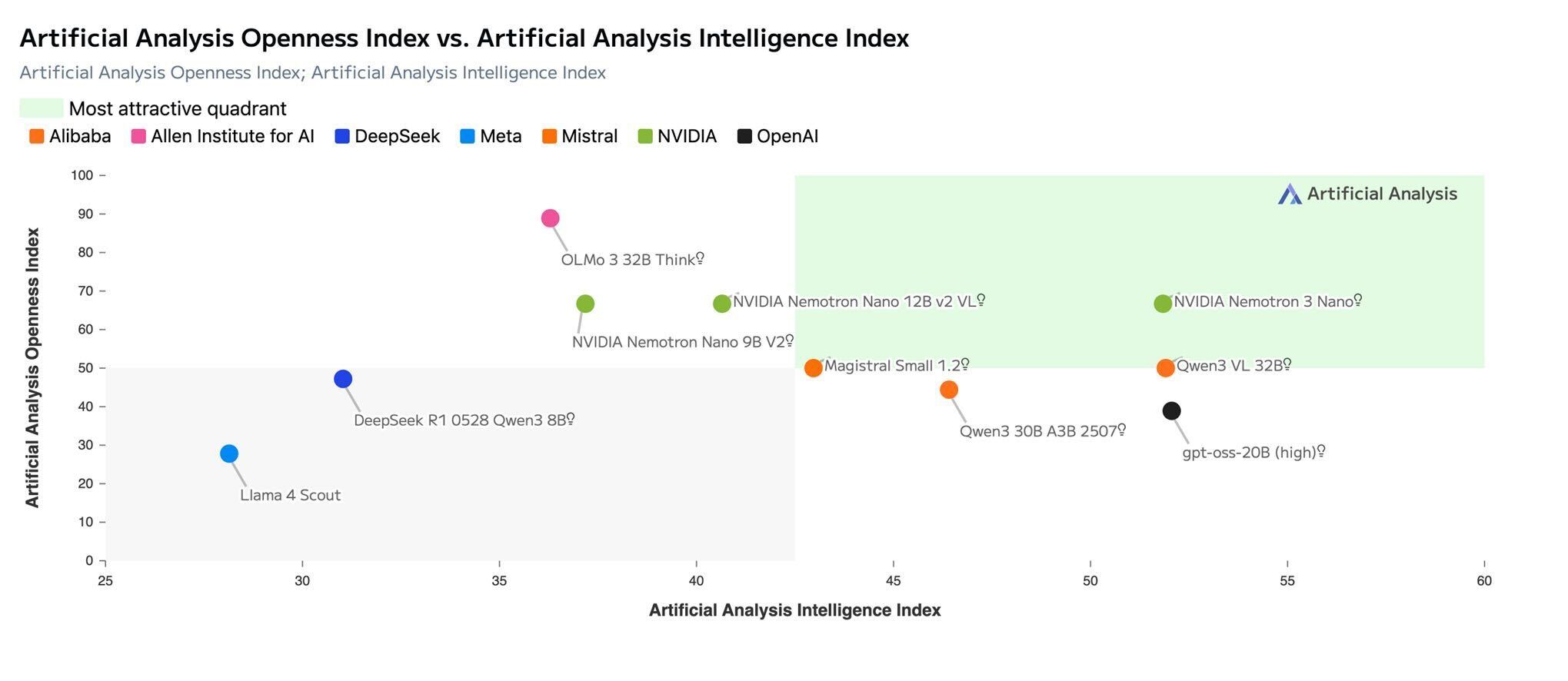
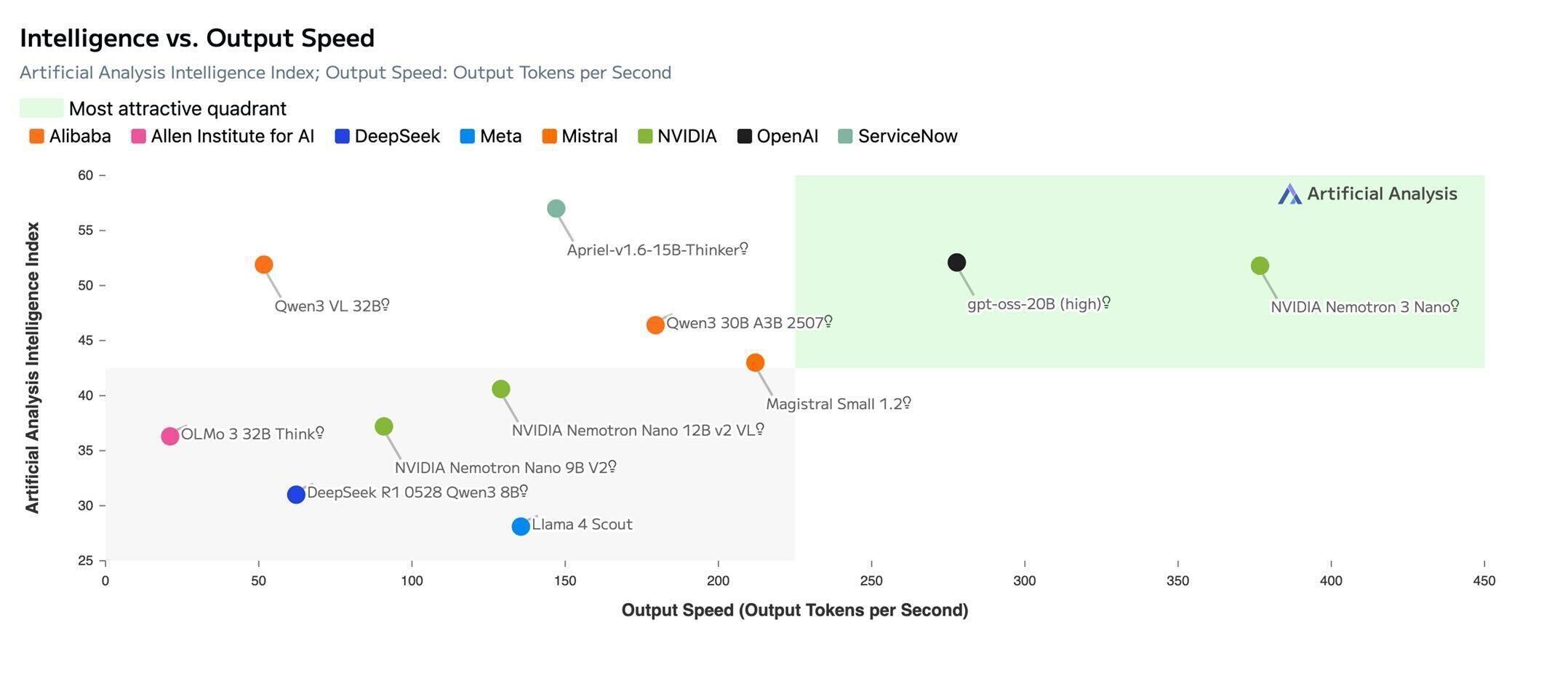
Source: Artificial Analysis
A key design principle of the Nemotron family including this model is openness: the weights, training data, and training recipes are available to the community. Teams can inspect, customize, or fine tune the model to fit research, product, or enterprise needs. This transparency aligns well with DeepInfra's mission to provide a predictable, developer-centric platform for running high-quality open models.
Flexible Deployment, Immediate Access
Nemotron 3 Nano supports a wide range of deployments—local hardware, cloud platforms, or NVIDIA NIM-based setups. On DeepInfra, the model is available through a fully managed endpoint, giving developers immediate access without navigating infrastructure provisioning or configuration.
Developers can expect:
- Fast, efficient inference enabled by the hybrid architecture and DeepInfra's low-latency stack
- Strong reasoning performance thanks to high-quality synthetic training and reinforcement learning alignment
- Full transparency and adaptability via open weights and reproducible training methods
- Seamless deployment across local environments, cloud infrastructure, or DeepInfra-managed endpoints
Getting Started with Nemotron 3 Nano on DeepInfra
To explore Nano's capabilities, use our ready-to-use Jupyter notebook. It's the fastest way to get started with working examples you can run immediately.
Quick Start with the Tutorial Notebook
A hands-on guide showing how to run Nano, tune reasoning parameters, use long-context inputs, and build lightweight agentic workflows.
The nemotron-3-nano-tutorial.ipynb notebook walks through:
- Basic inference with the DeepInfra API
- Reasoning parameter tuning (temperature, top_p) for different use cases
- Long-context handling for extended documents
The notebook includes working code snippets you can copy and use immediately.
Enterprise-Grade Security and Privacy
DeepInfra operates with a zero-retention policy. Inputs, outputs, and user data are not stored. The platform is SOC 2 and ISO 27001 certified, following industry best practices for security and privacy. More information is available in our Trust Center.
Start Building
Visit the Nemotron 3 Nano model page on DeepInfra to explore pricing and start inference instantly, or check out our documentation to learn more about the broader model ecosystem and developer resources.
Have questions or need help? Reach out to us at feedback@deepinfra.com, join our Discord, or connect with us on X (@DeepInfra) - we're happy to help.
 DeepSeek V4 Pro Is Now Available on DeepInfra<p>DeepSeek released V4 Pro on April 24, 2026 — a 1.6 trillion-parameter Mixture of Experts model with 49 billion active parameters, a 1-million-token context window, and weights available on Hugging Face under an MIT license. On LiveCodeBench, the V4-Pro-Max reasoning variant scores 93.5 Pass@1, leading every model in the comparison set, including Gemini-3.1-Pro High at […]</p>
 Decision Models: The Fast Layer for AI Agents<p>There is a decision your agent makes dozens of times per session that you are probably paying a frontier model to handle. Should this request go to the fast cheap model or the expensive one? Is this tool call safe to execute? Is the task actually finished, or does the agent think it is finished? […]</p>
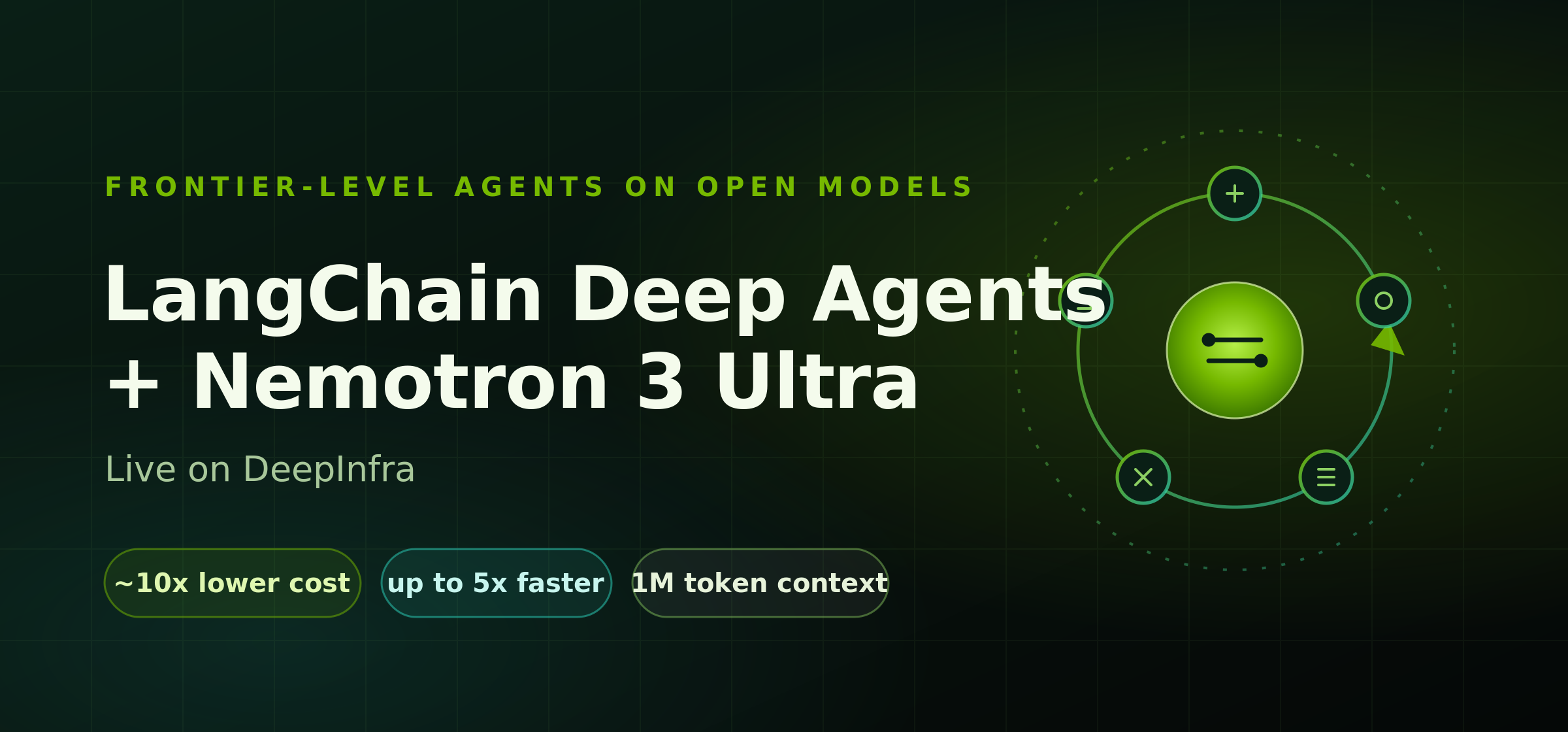 Frontier-Level Agents on Open Models: LangChain Deep Agents + NVIDIA Nemotron 3 Ultra, Live on DeepInfraOpen models have reached frontier-level agent performance. Starting today, you can point LangChain Deep Agents at NVIDIA Nemotron 3 Ultra running on DeepInfra and get top-tier agent accuracy at roughly 10x lower cost than leading closed models.



© 2026 DeepInfra. All rights reserved.